Squishify - Mesh Stretch & Deformation System
Roblox Creator Tools / Squishify System
Squishify
for Roblox creators.
Add soft, stretchy, and interactive objects to your Roblox
experience. Squishify lets players stretch MeshParts, press
them down by standing on them, and watch them return to shape
with elastic motion.
01
What is Squishify?
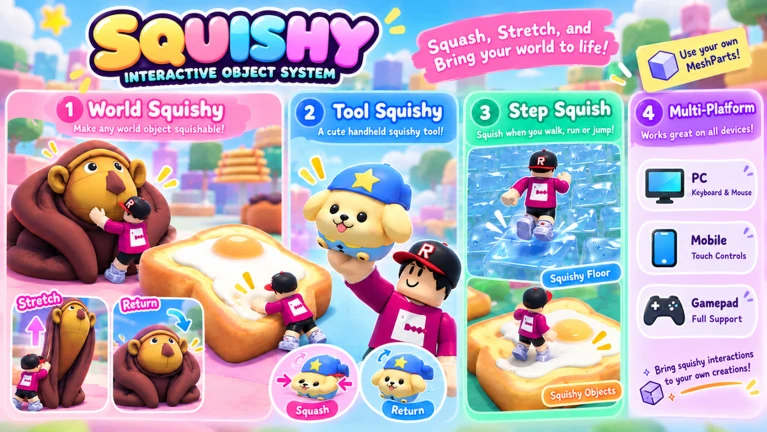
Squishify is a Roblox system for making MeshParts feel soft
and interactive. Players can stretch objects, compress them
by stepping on them, and see them smoothly return toward
their original shape.
Use it to add tactile interactions to platforms, props, and
other objects in your experience. The system is designed to
work with your own MeshParts, so you can adapt the effect to
your game's style.
02
Three Squishy Types
Stretch + Step
Players can stretch an object by dragging it and
compress it by stepping on it.
Step Only
Create soft platforms or props that compress when
a player stands on them.
Tool Squishy
Let players equip and stretch squishy objects
directly in their hands.
03
Features
- Smooth stretching, squishing, and elastic return effects
- Mouse, mobile touch, and gamepad controls
- Customizable grab, stretch, release, and step sounds
- Visual synchronization for multiplayer experiences
- Adjustable deformation, speed, sensitivity, and sound settings
- Designed to work with your own MeshParts
04
Made for Interactive Worlds
Soft platforms
Add springy platforms that respond when players
stand or jump on them.
Hands-on props
Give players objects they can pull, stretch, and
experiment with.
Playful environments
Bring extra physical feedback to simulators, obbies,
and other interactive spaces.
05
Asset Details
- Creator Store asset: Squishify - Mesh Stretch & Deformation System
- Asset type: Model
- Contains scripts
- Price and availability may change; check the Creator Store listing
SQUISHIFY
Make your world feel
soft, stretchy, and interactive.
Add responsive squishy objects to your Roblox experience
and customize their movement, controls, and sounds.